


Typeform made forms feel like a conversation: one question on the screen, then the next. The idea worked, and many tools followed. But if your audience writes in Arabic, or speaks more than one language, the question is not which tool looks nicest. It is which one handles Arabic from the start, how many responses you can collect before you pay, and whether you can show the form in more than one way.
Here we compare Formza, Typeform and Tally as they stand today, in October 2026. Everything about Typeform and Tally comes from their own pricing and help pages, linked at the end. We are the Formza team, so we also say plainly where the other two are ahead.
The short answer, in a table
| Feature | Formza | Typeform | Tally |
|---|---|---|---|
| Free plan | Unlimited forms and responses within fair use | A limited number of responses a month | Unlimited forms and submissions within fair use |
| First paid plan | On the pricing page | Basic: $39 a month, or $28 billed yearly, with 100 responses a month | Pro: $29 a month, or $24 billed yearly |
| Arabic & RTL | Arabic-first | Supported since October 2023 | Supported, with a text-direction setting |
| One form, several languages | 3 free, 24 on Pro | On the Talent and Growth Flow plans | Not built in; Tally suggests Weglot with a custom domain |
| One question per step | Conversational mode | Its core style | By splitting the form into pages |
| Every question on one page | Standard mode | Multi-question pages, for some question types | Its core style |
| Remove the tool's branding | With Pro | From Plus ($79 a month) | With Pro |
| Custom domain | On request | Enterprise plan | With Pro |
| Drop-off rates | On the results page | From Business ($129 a month) | Visit analytics on Pro |
Why people look for a Typeform alternative
Answering a Typeform is pleasant, which is why it is so well known. But three things send many people looking elsewhere, especially in the Arab world:
- The free limit: Typeform's pricing page describes the free plan as “a limited number of responses per month”, and its first paid plan, Basic, starts at 100 responses a month. An Instagram campaign or a shop's customer survey can pass that in a day.
- Languages: multi-language forms come with the Talent ($169 a month) and Growth Flow plans, not the first tiers. Anyone speaking to an Arabic and English audience at once needs it from day one.
- One style: Typeform is built around one question at a time. That suits a short survey, and is less suited to a long form, such as a job application, whose respondent wants to see every question at once.
What is Formza?
Formza is a form and survey builder designed for Arabic first: the font, direction and numbers are set right from the start, and it works just as well in English. You build the form once, then choose how it shows: standard mode with every question on one page, or conversational mode with one question per step, the Typeform way, with keyboard shortcuts.
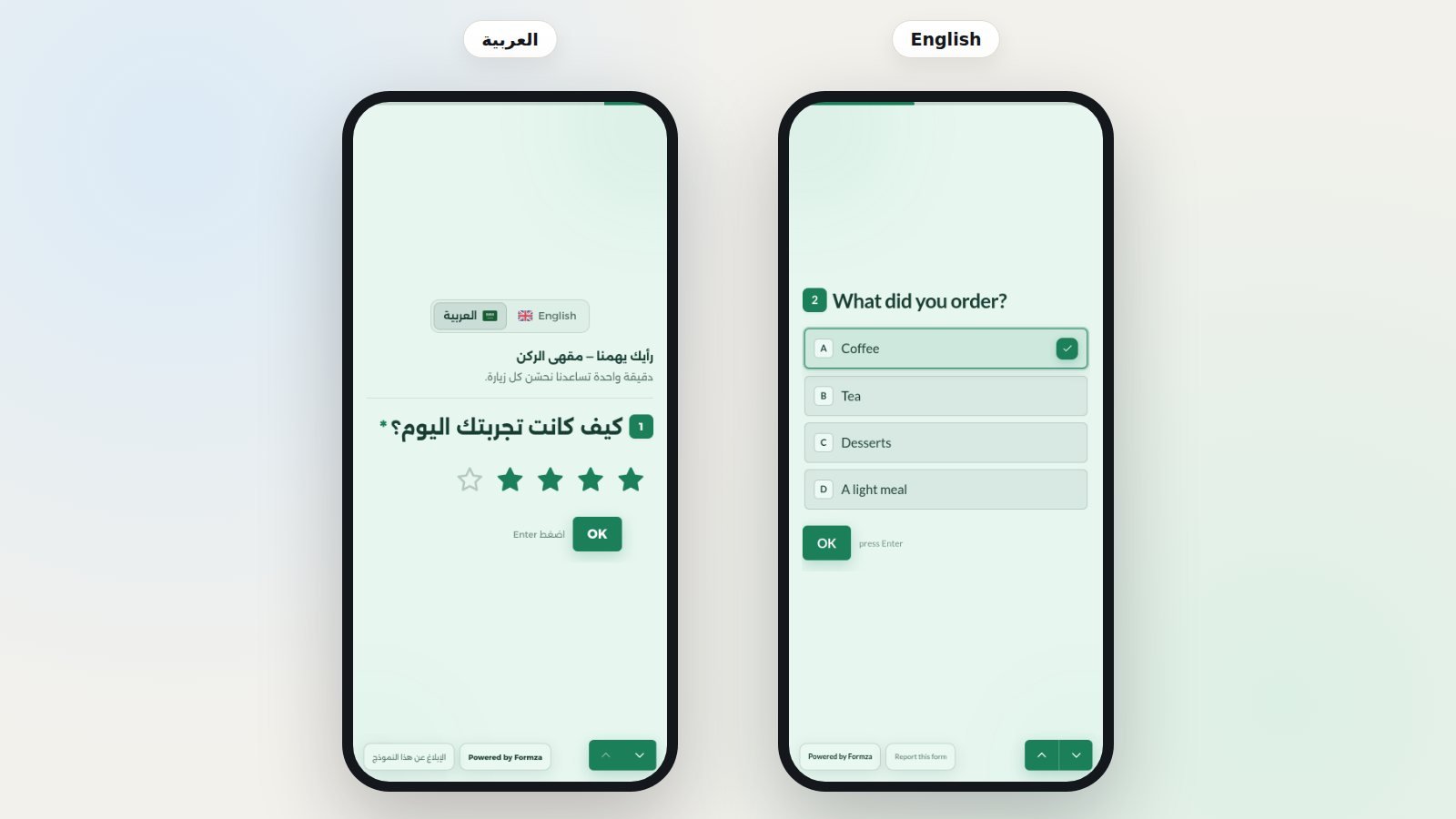
The free plan has unlimited forms and responses within the fair use policy, with no trial period and no card. Pro hides Formza's branding so only yours shows, and adds tools such as blocking duplicate responses and up to 24 languages in one form.
Arabic: “supported” is not the same as “designed for”
Typeform added Arabic in October 2023, its first right-to-left language, chosen in the form's settings. Tally supports Arabic, Hebrew and Yoruba, and choosing one of them brings up a text-direction setting. Either is enough for a simple form.
The difference shows in the details: an Arabic font that reads well on a phone screen, numbers that stay in the form your audience expects, a phone field and country code that do not flip, error messages in the right place, and ready lists such as countries with their flags, Egyptian governorates and banks. In Formza these details are part of the tool rather than an extra setting, because Arabic is the language the product was built in, and the editor itself works in Arabic.
One form, several languages
If your customers speak Arabic and English, the usual answer is two forms, two links and two response tables that you merge by hand. In Formza one form carries up to 3 languages on the free plan and 24 on Pro, the visitor picks theirs at the top of the page, and every response lands in one place. AI translation translates the whole form in one click, then you review each text before publishing.
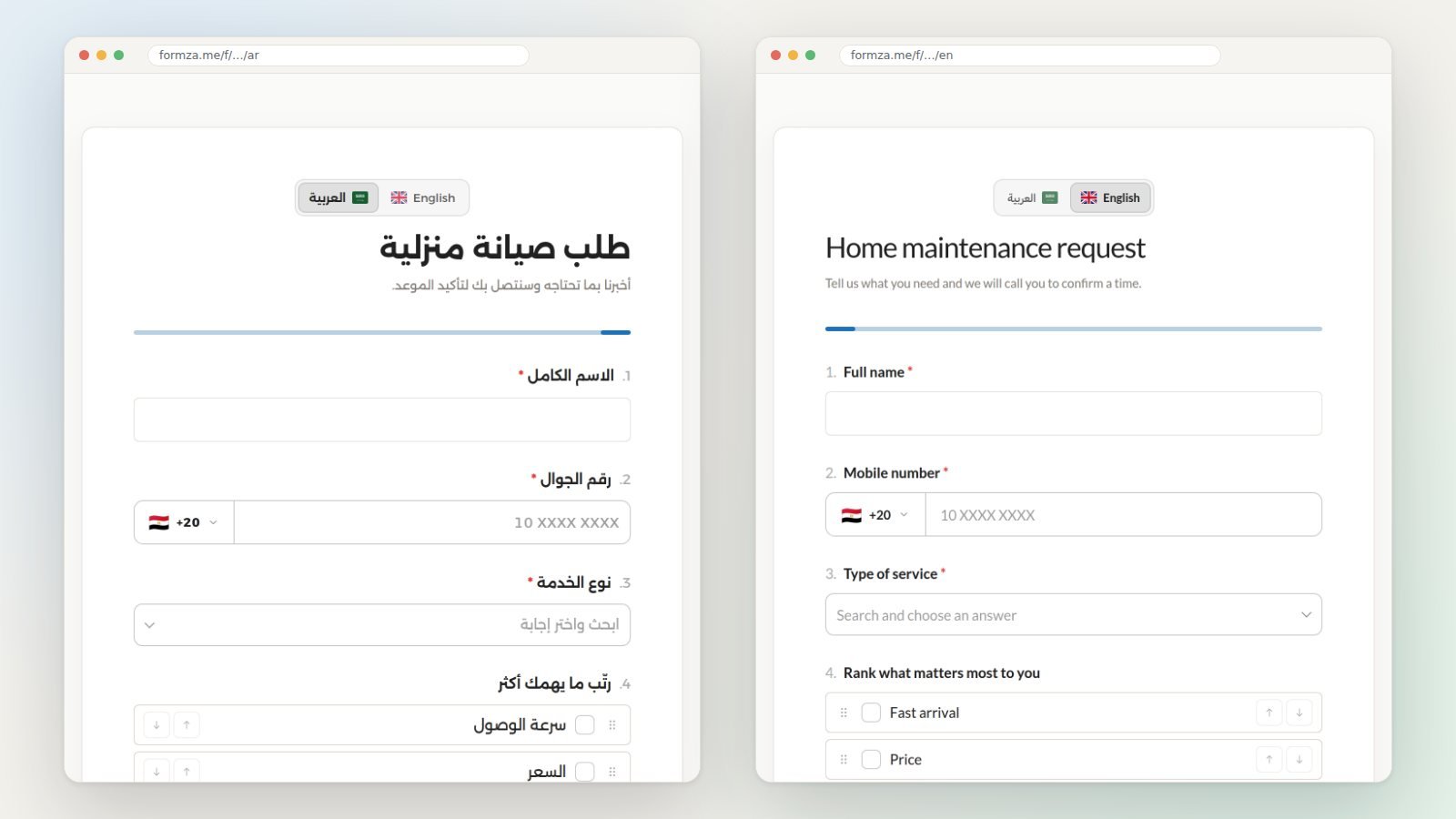
In Typeform, multi-language forms start at the Talent plan. Tally's help centre says the feature is not available yet, and suggests connecting the form to the Weglot translation service through a custom domain, which is a Pro feature. Tally does translate its own default texts, such as error messages and the thank-you page, into more than 50 languages, but the questions you write are in one language.
Conversational or standard? You don't have to choose up front
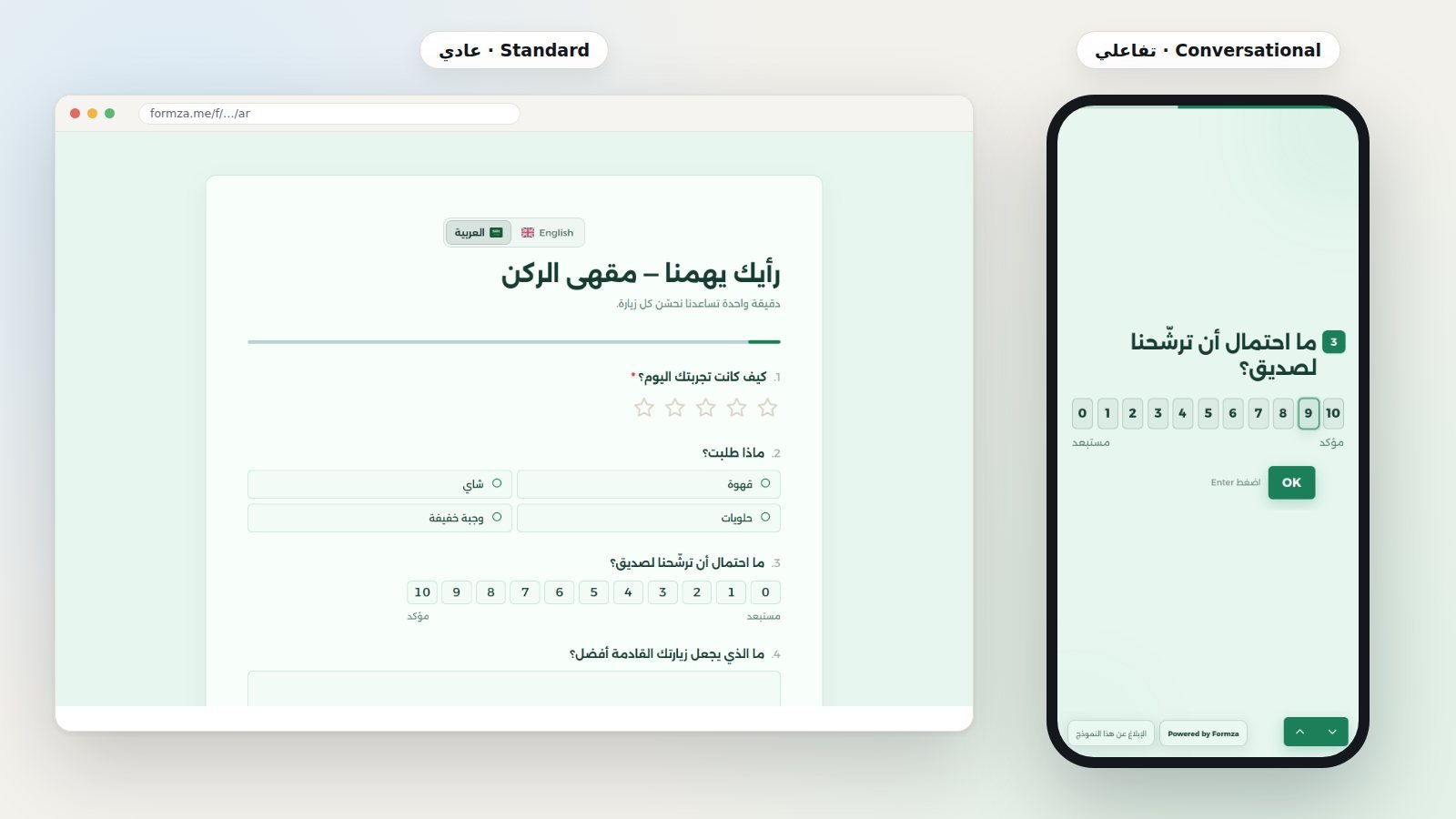
One question per step keeps attention on short surveys and sign-ups, but a long form, such as a job application or a data sheet, is filled in faster when the person can see every question. Typeform starts from the first style and allows multi-question pages for some question types; Tally starts from the second and lets you split a form into pages.
In Formza it is one setting on the form itself: the same questions, logic and design, and you switch the layout whenever you like, even after publishing. The template cards show each template's kind, conversational or standard, before you open it.
Questions, logic and design
- Advanced question types: ranking, grid, finger signature, ratings with stars, faces or numbers, and file uploads that need no visitor account.
- Conditional logic: show a question based on an earlier answer, end the form when an answer matches, or send high ratings on to your Google reviews page.
- Design: your colours, font, logo and cover, with ready light and dark themes, and an icon for each question in the form's colour.
- Formza AI: describe what you need in your own words, and it builds a form you can then edit however you like.
In return, Typeform leads elsewhere: video questions on the Talent plan, payment questions through Stripe, and a wide integrations library. Tally's free plan collects payments, signatures and files. Formza does not take payments inside the form today, so if payment is central to your form, keep that in mind.
Sharing: link, QR code and embed
Once published, the share window gives you the form's link in each language, WhatsApp, Facebook, LinkedIn, X and email buttons with ready texts, the code to embed the form in your site, and a QR code in your colours, ready to print as PNG, SVG or PDF, with your logo in the middle on Pro. The window also warns you if you pick two colours too close for a camera to read.
Responses and analytics
Formza's results page shows where each visit came from, the question where people who did not finish stopped, and the average of each rating question with how the choices split. Export responses to Excel or CSV, or send them to Google Sheets as a row per response. If your form is a contest, you draw the winners straight from the responses.
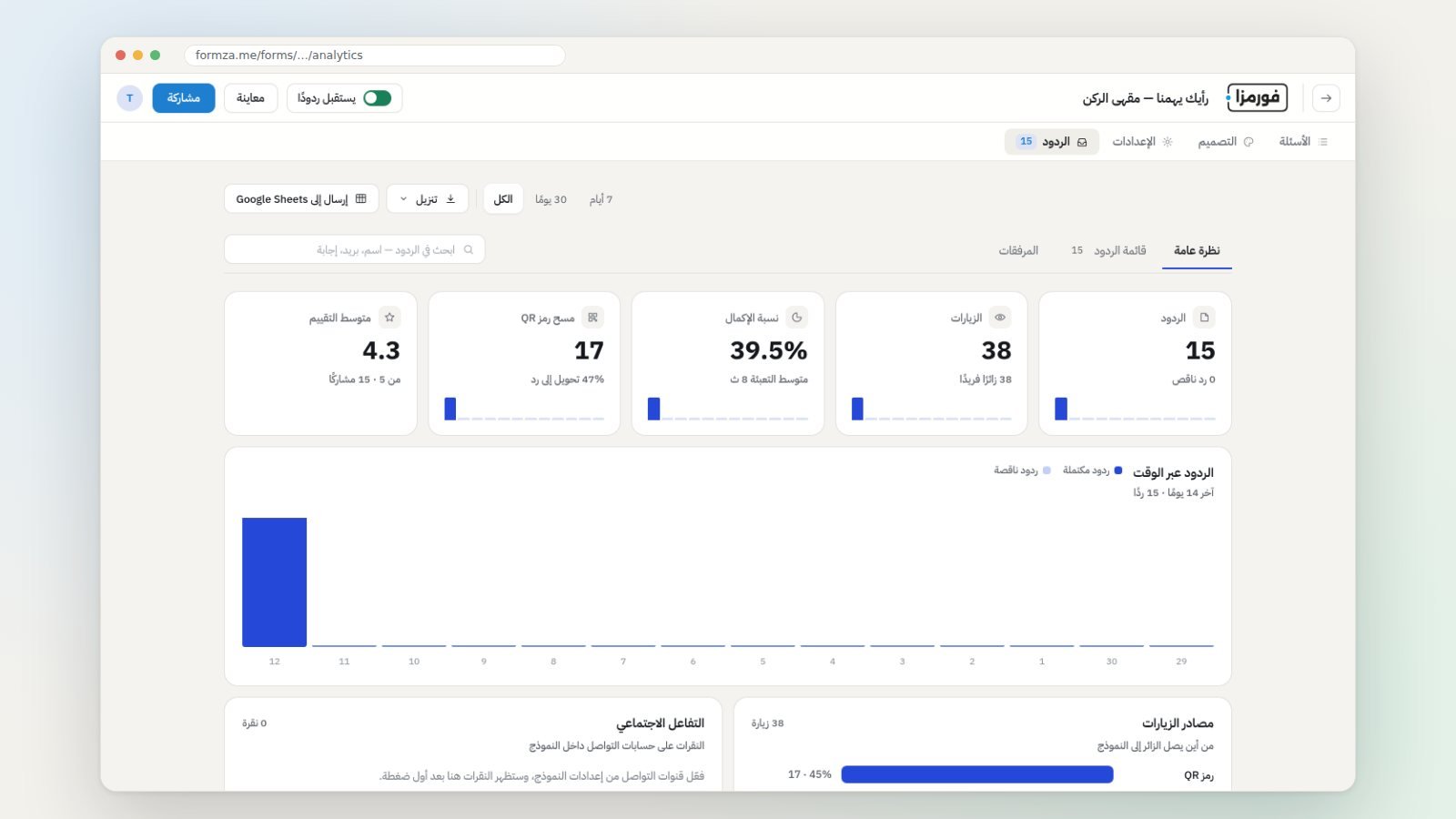
Typeform puts drop-off rates and conversion tracking on its Business plan ($129 a month). Tally offers extended visit analytics on Pro.
Pricing and free plans in detail
Prices change, so here they are as listed in October 2026, in US dollars, with links in the sources:
- Typeform: a free plan with a limited number of responses. Basic at $39 a month ($28 billed yearly) with 100 responses a month and one seat. Plus at $79 ($56 yearly) with 1,000 responses, three seats and branding removed. Business at $129 ($91 yearly) with 10,000 responses. Talent at $169 ($119 yearly) with multi-language forms and video questions.
- Tally: unlimited forms and submissions free, within fair use, with a 10 MB limit per uploaded file. Pro at $29 a month ($24 billed yearly) for branding removal, custom domains and team workspaces. Business at $89 ($74 yearly) for email verification and data retention controls.
- Formza: unlimited forms and responses free, within the fair use policy, with no trial period. Pro hides Formza's branding and adds up to 24 languages per form, your logo in the QR code and blocking duplicate responses. The current price is on the pricing page: https://formza.me/en/pricing
If your only measure is free responses, Tally and Formza are close, and both are far more generous than Typeform. If Arabic and several languages in one form are what matter, Formza is built for exactly that.
When to pick each
- Typeform: for marketing teams that need many integrations, video questions and enterprise features, and don't mind paying by response volume.
- Tally: for anyone who wants the most features free in one language, and likes writing forms in a document-style editor.
- Formza: for anyone speaking to an Arabic audience, or to several languages in one form, who wants both conversational and standard layouts, plus QR codes and winner draws without extra tools.
How to move your form to Formza
- Start from a template close to your form, or describe it to Formza AI in your own words and let it write the questions.
- Adjust the questions, and choose standard or conversational.
- Add a second language, translate it in one click, then review the translation.
- Publish, share the link or the QR code, and connect Google Sheets if you like.
There is no direct import from Typeform or Tally today, so the questions move over by hand or through Formza AI. A ten-question form takes minutes.
Frequently asked questions
Is Formza a free Typeform alternative? Yes. You can build conversational, one-question-per-step forms on the free plan, with unlimited forms and responses within the fair use policy.
Does Typeform support Arabic? Yes, since October 2023; you choose Arabic in the form's settings. Multi-language forms themselves are on the Talent and Growth Flow plans.
Does Tally support Arabic? Yes, with a text-direction setting. But one form in several languages is not built in, and its help centre suggests Weglot for that.
Can a Formza form look like a Typeform? Yes, choose Conversational in the form's settings: one question per step, with buttons and shortcuts to move between questions.
Does Formza take payments? Not inside the form today. Ask in the form which way to pay suits the customer, then confirm it with them.
Sources
- Typeform pricing page, checked on 12 October 2026: https://www.typeform.com/pricing
- Typeform's Arabic support announcement, 2 October 2023: https://community.typeform.com/typeform-updates-24/new-feature-alert-arabic-language-support-10412
- Typeform community on multi-question pages: https://community.typeform.com/build-your-typeform-7/more-than-one-question-on-a-page-258
- Tally pricing page (yearly billing), 12 October 2026: https://tally.so/pricing
- Tally's “free Typeform alternative” page (monthly billing): https://tally.so/help/tally-a-free-typeform-alternative
- Tally help on supported languages and text direction: https://tally.so/help/supported-languages
- Tally help on multilingual forms with Weglot: https://tally.so/help/how-to-create-multilingual-tally-forms-with-weglot
- Formza pricing page: https://formza.me/en/pricing


